



to run webray you need:

the blaxxun-contact plugin to be able to view the VRML that is used by webray. It's free and far more stabile as CosmoPlayer. (heavy multithreaded scene-graph-operations as in webray usaly make Cosmo crash)
go here to download it

A java enabled browser. Unfortunatly we currently only support M$IE (waiting for mozilla)
Please click here to let us check the settings for you
- Allow webray to get the html-files you want to search for / browse from the net.
First we would like to tell you why: For java applets
there is a so called "sandbox". This sandbox hinders applets
from doing things to your system like sniffing in your personal data,
deleting files and so forth. Unfortunatly this sandbox also hinders applets
from getting http-connects to other websites to.
webray is an applet.
webray wants to enable you to surf the net in 3D.
therefore webray has to step out of the sandbox. Mechanisms like signing
applets cost money (that we don't have), so please disable the security
setting for URL-requests for a moment, later you should switch back to
high security.
By clicking here we can check wether your sandbox is activated or not (which is the default)
to enable webray to make connections to the net for you please do the following:
- in your IE goto "Tools->Internet Options"
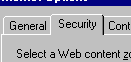
select the "Security"-tab from the tabbedDialog- press the "Custom Level" button
- press the "Java custom settings..." button
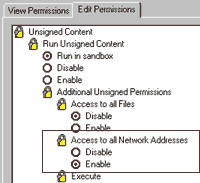
goto the edit permissions - pane an set this one option as shown above- restart your IE to activate the new setting and come back here
- check wether it was succesful by activating this applet again
You finaly made it!!!!
no go on an have fun with WEBRAY
(or go to the uggly but very small variant here
(not recommended)
